

TLDR
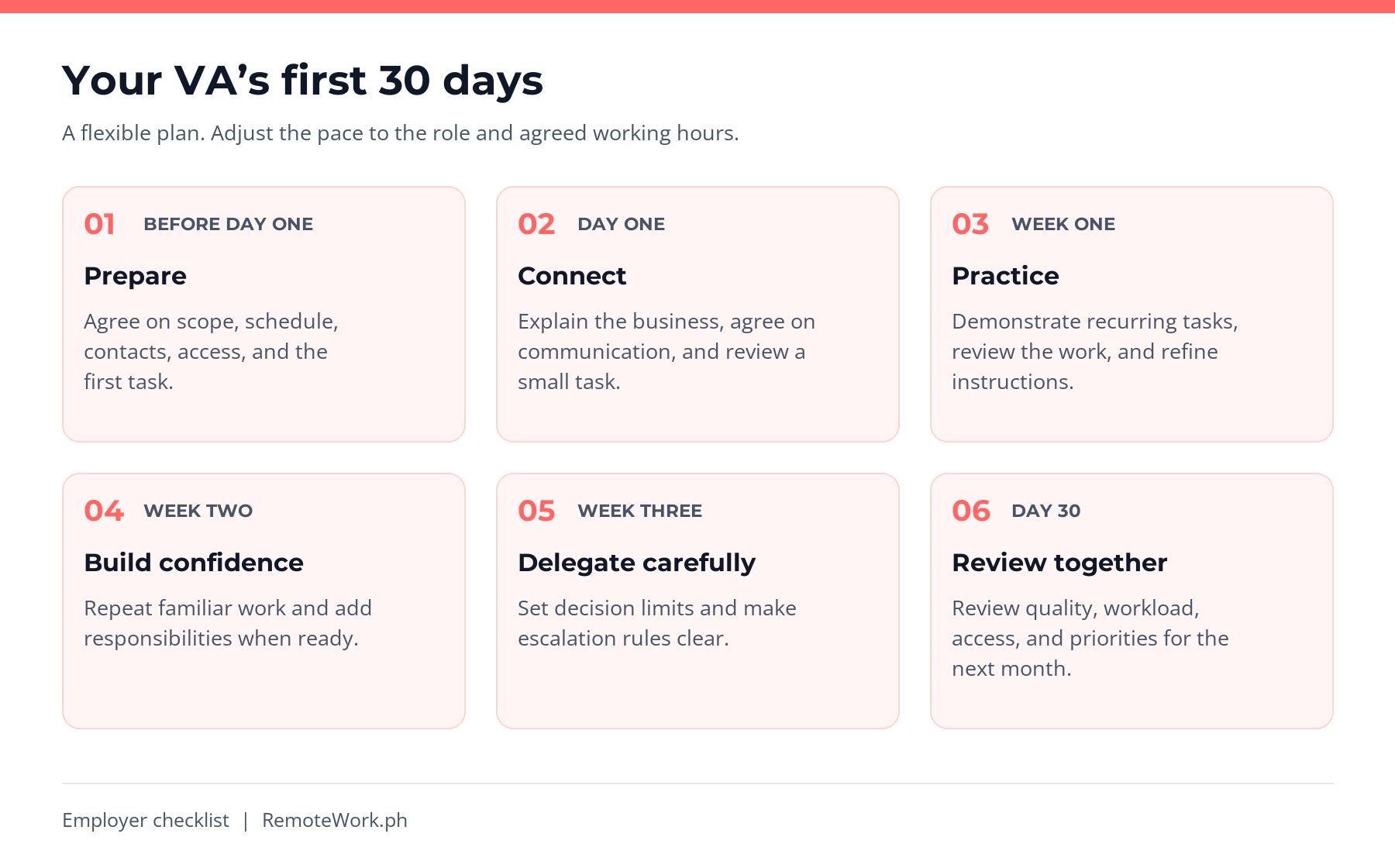
A virtual assistant onboarding process turns an accepted offer into a clear working relationship. Before assigning a full workload, give your new virtual assistant the context, access, instructions, and feedback needed to work confidently. Start with preparation, hold a kickoff meeting, practice recurring tasks, and review progress together.
This guide is for small-business owners and managers onboarding a Filipino virtual assistant after selecting a candidate. Use the 30-day plan and copyable checklist below to organize responsibilities, communication, and training. The schedule is a practical starting point, not a rule: adjust it to the role, agreed working hours, and complexity of the work.
Table of Contents
What Is a Virtual Assistant Onboarding Process?
Virtual assistant onboarding is the structured introduction of a remote professional to your business, team members, systems, and expectations. It covers both practical setup and learning how decisions get made. The goal is reliable collaboration, rather than immediate independence on every task.
Onboarding a VA versus onboarding clients
Here, you are the business bringing a new VA into your operations. A guide about onboarding clients explains how a service provider welcomes new customers. Some documents overlap, but the responsibilities differ. Your job is to provide business context, clear priorities, and a route to help.
What an effective onboarding process should establish
By the first review, both people should know which tasks the VA owns, what good work looks like, where instructions live, and when approval is required. A solid onboarding process also gives remote team members a clear way to raise blockers without guessing or waiting silently.
Your 30-Day Virtual Assistant Onboarding Checklist
Copy this virtual assistant onboarding checklist into a shared document or your existing project management software. Replace the examples with your own deadlines and decision rules. Mark a task complete when the result has been checked, not simply when an invitation has been sent.
Swipe sideways to view the full table.
| Stage | Owner | Onboarding tasks | Completion evidence |
|---|---|---|---|
| Before day one | Manager | Confirm scope, schedule, contacts, permissions, and first task. | Written plan agreed; required access tested. |
| Day one | Manager and VA | Hold an introductory call, explain the business, and complete a small task. | VA can explain the priority and locate instructions. |
| Days 2–5 | VA, with manager review | Practice recurring tasks using examples and SOPs. | Reviewed work and updated instructions. |
| Week two | VA and manager | Repeat familiar work and add one responsibility. | Agreed quality checks passed; blockers recorded. |
| Week three | VA and manager | Handle routine decisions within documented limits. | Exceptions escalated to the right person. |
| Day 30 | Manager and VA | Review outcomes, workload, access, and next priorities. | Next-month plan and support needs agreed. |
Before Day One: Pre-Onboarding Preparation
Pre-onboarding is the preparation you complete before the VA’s first working day. Assign an owner to each setup task so your VA onboarding process starts with working access and clear instructions, rather than a list of unresolved requests.
Set clear expectations and responsibilities
Write a short role summary with three initial priorities. Separate tasks the VA can complete independently from tasks requiring review. For example, an inbox assistant might label messages and draft responses while the business owner approves refunds, complaints, and unusual requests.
Confirm the agreed scope, compensation arrangements, confidentiality expectations, and any relevant paperwork before work begins. Requirements depend on the working arrangement and jurisdiction; use qualified advice for contracts, worker classification, and sensitive-data obligations when needed.
Set expectations for availability
Record working hours in both time zones, including the date used for the conversion. Agree on overlap for video calls and how to handle schedule changes, local holidays, and connectivity interruptions. Do not assume a remote VA is available outside the agreed schedule.
Create logins and limit permissions
Use individual accounts and delegated permissions where supported instead of sending your own passwords. Enable multifactor authentication where available. Give access to the necessary tools and folders for assigned work, and keep ownership with the business.
Check inherited folder access as well as individual files. Google’s Drive permissions guidance explains how viewer, commenter, and editor roles differ and how parent-folder permissions affect files. Choose the level that fits the task rather than making every new hire an administrator.
Organize key documents and file storage
Create one starting document linking to the role summary, company policies, key contacts, task board, SOPs, and approved examples. Keep sensitive information in restricted storage. A link to a maintained document is easier to update than several conflicting copies sent through chat.
Day One: Run a Focused Introductory Call
Explain the business and company culture
Introduce your customers, products, team structure, and current priorities. Explain how the VA’s work supports them. Make company culture concrete: show an example of a helpful customer reply or a well-written internal update rather than relying on abstract values alone.
Introduce key contacts and reporting structures
Name one person who sets priorities and one backup contact for urgent issues. Introduce other team members the VA will work with. If different people can assign tasks, explain who resolves conflicts so the new employee or contractor is not left negotiating competing deadlines.
Choose communication tools and protocols
Decide which communication tools serve which purpose. Use your task board for work and deadlines, chat for short questions, and a scheduled call for decisions that need discussion. Record communication preferences and the preferred communication style for customer-facing work.
If your team already uses Slack or Microsoft Teams, add the VA to the relevant channels and explain where decisions are recorded. Clear communication depends on shared habits as well as software. Avoid introducing a new app unless it solves an identified problem.
Include response time expectations in your communication protocols, within working hours, and define what counts as urgent. For example, a routine question can wait until the next check-in, while an unexpected customer-data request should be escalated before any action. Explain the backup channel if the main tool is unavailable.
Choose a small first task
Assign a low-risk task with a clear deadline, example, and reviewer. Ask the VA to summarize their understanding before starting. Review the result together and explain any corrections. This establishes a learning loop before high-impact work is delegated.
Week One: Document and Practice Business Processes
Write standard operating procedures
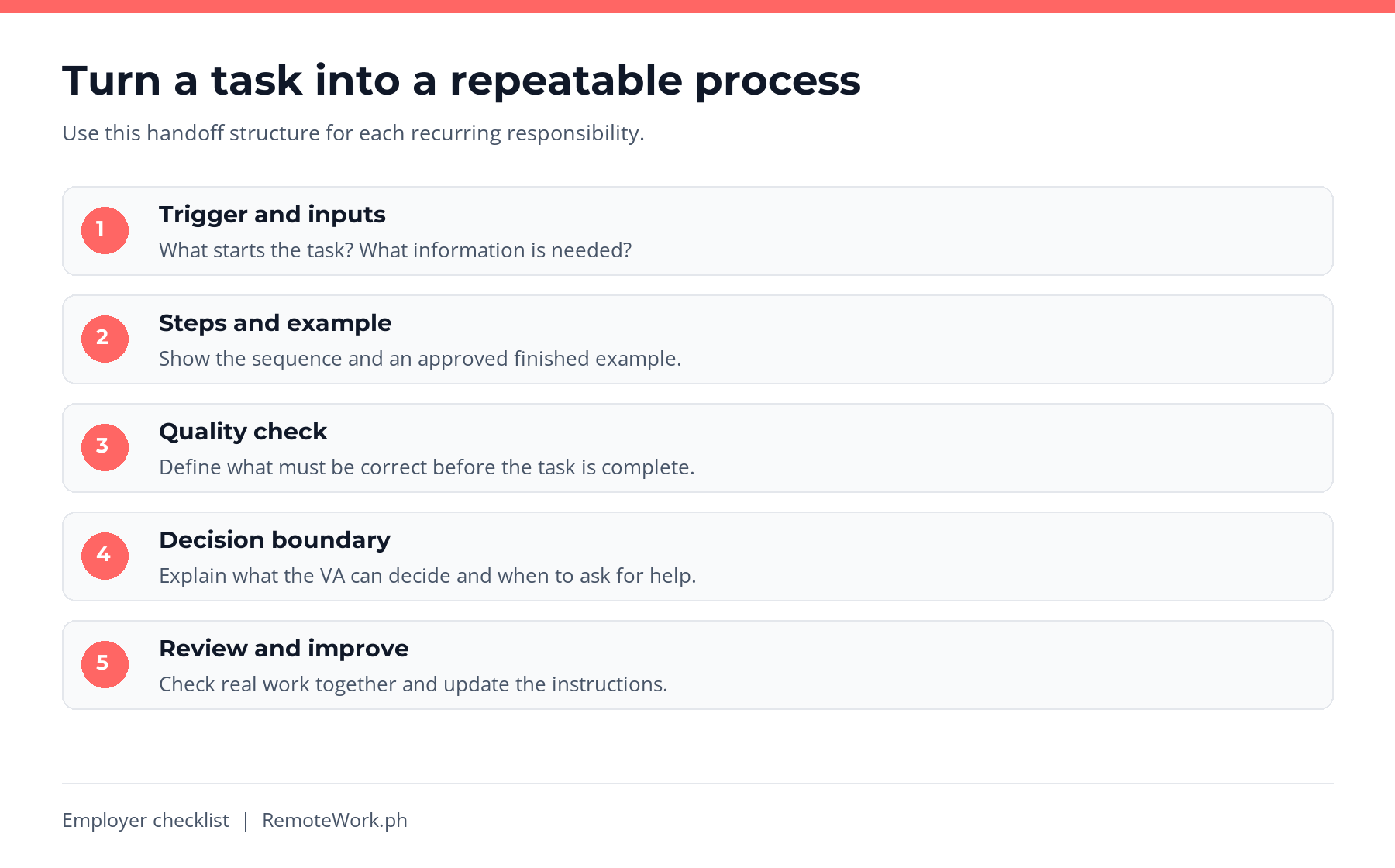
Document recurring business processes in short, usable steps. Each SOP should explain the trigger, required inputs, actions, quality checks, destination for the result, and escalation rules. Add a version date and owner so the VA knows whom to ask when instructions conflict.
For a weekly report, identify the approved data source, reporting period, template, reviewer, and delivery time. Include a completed example with fictional or appropriately protected data. Avoid asking the VA to infer the process from an old report whose assumptions are unclear.
Use demonstration, practice, and review
Demonstrate one task, let the VA repeat it, and review the output against the same criteria. If you record a walkthrough, remove confidential tabs and customer details first. Store the explanation with the written SOP for future reference rather than leaving it buried in a message thread.
Keep one source of task ownership
A shared spreadsheet can work for a small workload; project management tools can help when assignments have dependencies or several reviewers. Choose one place to record the owner, deadline, status, and next action. You do not need several project management subscriptions to start onboarding.
Build regular feedback into the week
Arrange brief check-ins during the first few days if both schedules allow. Ask what was completed, what is blocked, and which instruction needs clarification. Daily contact is a useful option for a new working relationship, not a guarantee against performance issues or a requirement for every part-time role.
Give specific, honest feedback tied to the work: identify the step, explain its effect, and show the preferred result. Invite the VA to point out missing information. Record decisions once so both people can refer back to them.
Weeks Two and Three: Increase Responsibility Gradually
Expand from demonstrated competence
Add responsibilities when the VA can complete initial tasks accurately and explain exceptions. Gradual delegation makes it easier to identify training gaps. For remote executive assistants, calendar changes involving external partners may need a different approval threshold from organizing internal files.
Define practical decision rules
Explain what can be decided without permission and what must be escalated. A social media management task might allow scheduling approved posts but require review for new offers or public complaints. Define the boundary before giving publishing access.
Review capacity and team dynamics
Compare the assigned workload with actual time and available hours. If task completion is slower than expected, check access, examples, instructions, and dependencies before assuming a motivation problem. Invite remote employees and contractors to raise conflicting requests early.
Update the process as you learn
Ask the VA to note unclear steps and suggest improvements. Approve changes before replacing important documents or company-wide processes. Continuous improvement during onboarding should produce clearer instructions, not an expanding workload without agreement.
Day 30: Review Outcomes and Agree on Next Steps
Start tracking performance with clear key performance indicators
Use a few performance metrics tied to responsibilities, such as accurate calendar entries, correctly categorized messages, or reports delivered by the agreed deadline. Define key performance indicators together. Hours logged or messages sent alone do not show whether the work was useful.
During the first few weeks, record a small sample of reviewed work and discuss the reason for each correction. Compare progress with your agreed quality standard, rather than treating another business’s results as a performance benchmark.
Check quality, independence, and support needs
Review examples of completed work, repeated corrections, unresolved blockers, and decisions escalated appropriately. Ask whether the VA has the context and necessary tools to succeed. A structured onboarding program should reveal what support is needed as well as what is going well.
Plan the next month
Agree on the responsibilities to keep, add, or pause. Set the next follow-up meeting and decide which training needs attention. Review permissions after scope changes. If a trial period was agreed, assess it against the documented terms rather than introducing surprise criteria.
Thirty days is not a universal deadline for full performance. As an example of a real remote organization, GitLab’s onboarding handbook separates general and role-specific tasks and uses a 30-day due date for its main onboarding section. A small business should adapt the approach to its own work rather than copy another company’s schedule unchanged.
A Practical Onboarding Example for a Small Business
Consider this fictional example: a consulting business brings in a VA for ten hours per week to organize inquiries and prepare meeting notes. The owner remains responsible for pricing, contracts, and client commitments. The first-month objective is dependable administrative support, not an immediate increase in revenue.
Swipe sideways to view the full table.
| Work item | Definition of done | Approval boundary |
|---|---|---|
| Organize inquiries | Messages categorized using agreed labels; uncertain items flagged. | No replies about pricing or contracts without owner approval. |
| Draft meeting notes | Decisions, owners, and due dates checked against the source. | Owner reviews before notes are shared with clients. |
| Prepare weekly update | Completed work, blockers, and next priorities recorded. | Discuss proposed scope changes before taking on more work. |
During week one, the owner demonstrates both tasks using sample data. In week two, the VA repeats them with review. In week three, routine categorization becomes independent within the agreed limits. At day 30, they review accuracy, workload, and which approvals can safely change.
Where the Hiring Marketplace Fits in the Journey
RemoteWork.ph helps businesses connect with Filipino remote professionals through its direct-hire marketplace. Its virtual assistant hiring page lets employers explore relevant profiles and explains the path from posting a job to messaging applicants and managing a hire directly.
Choosing remote talent and onboarding that person are connected steps. Write down the responsibilities before selecting a candidate, then carry those same responsibilities into the training plan so the job you described matches the work you delegate.
The walkthrough below follows an employer handing off the first week’s work to a sample VA, Juan Dela Cruz. The conversation images are adapted illustrations with sample names and wording. They show a direct-message onboarding example, rather than a completed hire or live access setup.
1. Start from your employer dashboard
If you already have an account, open your employer dashboard. Jobs & Talent Overview separates job posts, applicants, views, and bookmarks. The Post a Job button starts the role-posting form; the company-profile prompt points you toward business details candidates may want to review.
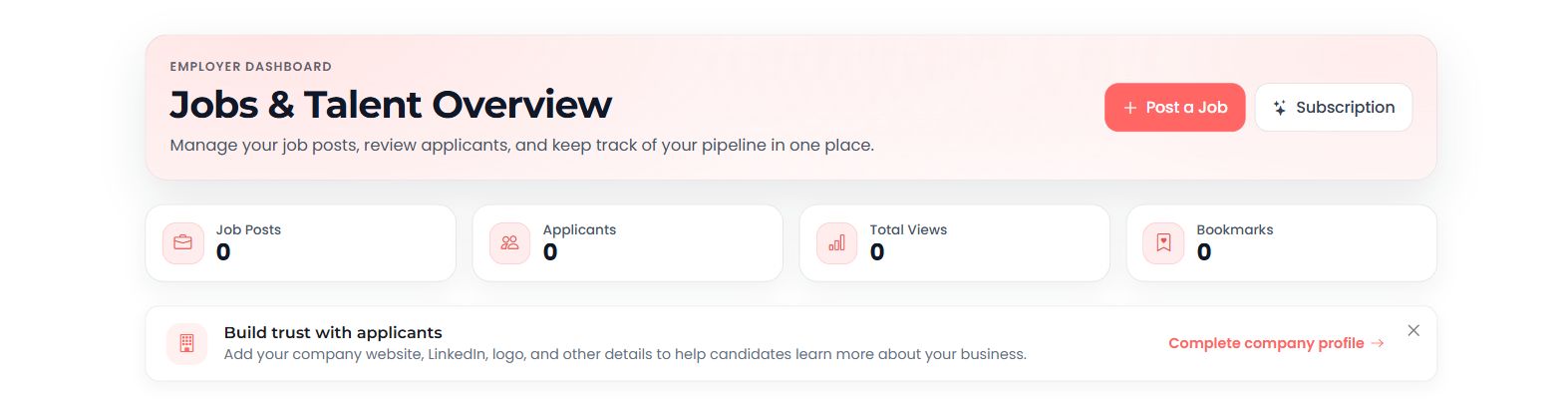
Employer dashboard before a job is posted.
2. Prepare a clear role brief
If you choose to advertise a genuine opening, select Post a Job. The form asks for the job title, employment type, description, hourly rate in USD, desired weekly hours, contact and company details, and two to five required skills. Keep the responsibilities consistent with the work you intend to delegate.
For the fictional consulting-business example above, the initial responsibilities are organizing inquiries and drafting meeting notes, with clear approval boundaries. The form below is shown before any details are entered. Our message demonstration uses direct contact with a candidate instead of publishing a job.
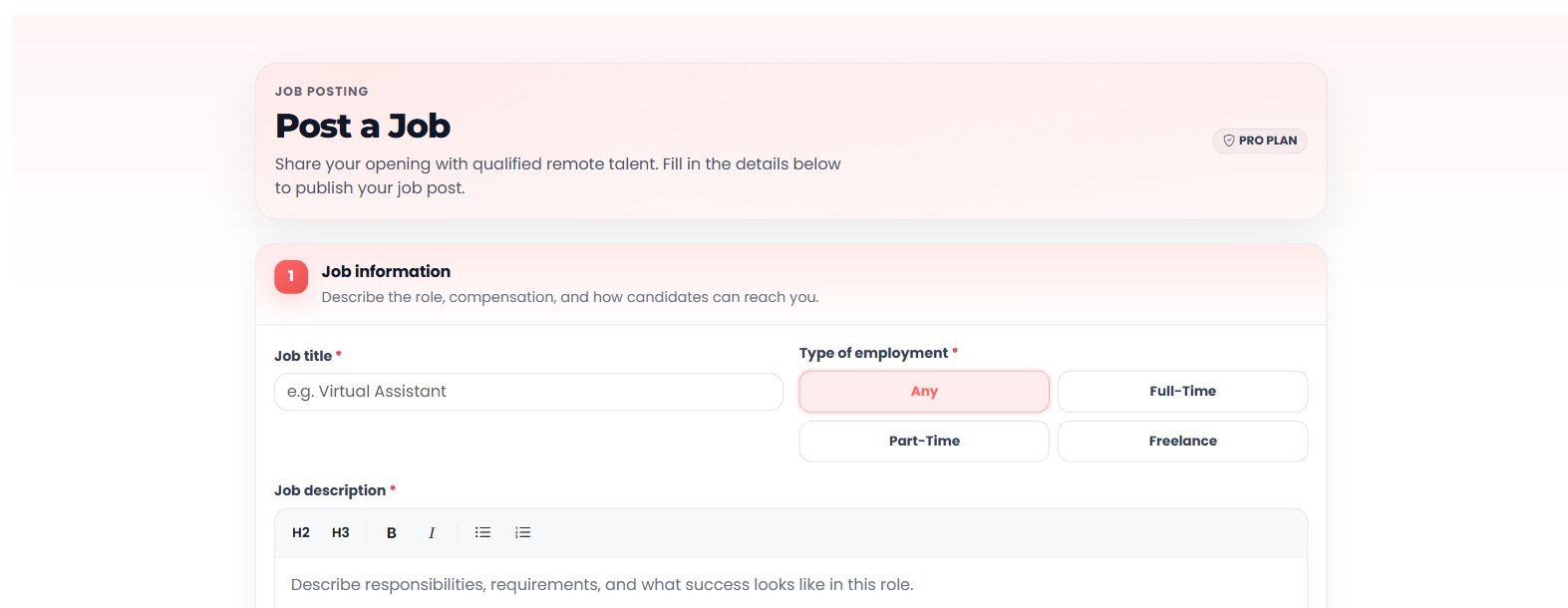
Top of the job form in the example Pro account. No sample opening was published.
3. Send the employer’s handoff through Direct Messages
For direct contact, use the employer talent search, open the selected professional’s profile, and choose Message. In this example, the employer welcomes Juan, explains his first tasks and working hours, sets a daily update, and identifies decisions requiring approval. The employer also promises the role brief, task checklist, and access invitations before the kickoff.
After sending, open Messages, then Direct Messages, to revisit the conversation. Job-application conversations have separate Inbox and Applications views. In the illustrative exchange, RemoteWork.ph Team is the employer and Juan Dela Cruz is the VA.
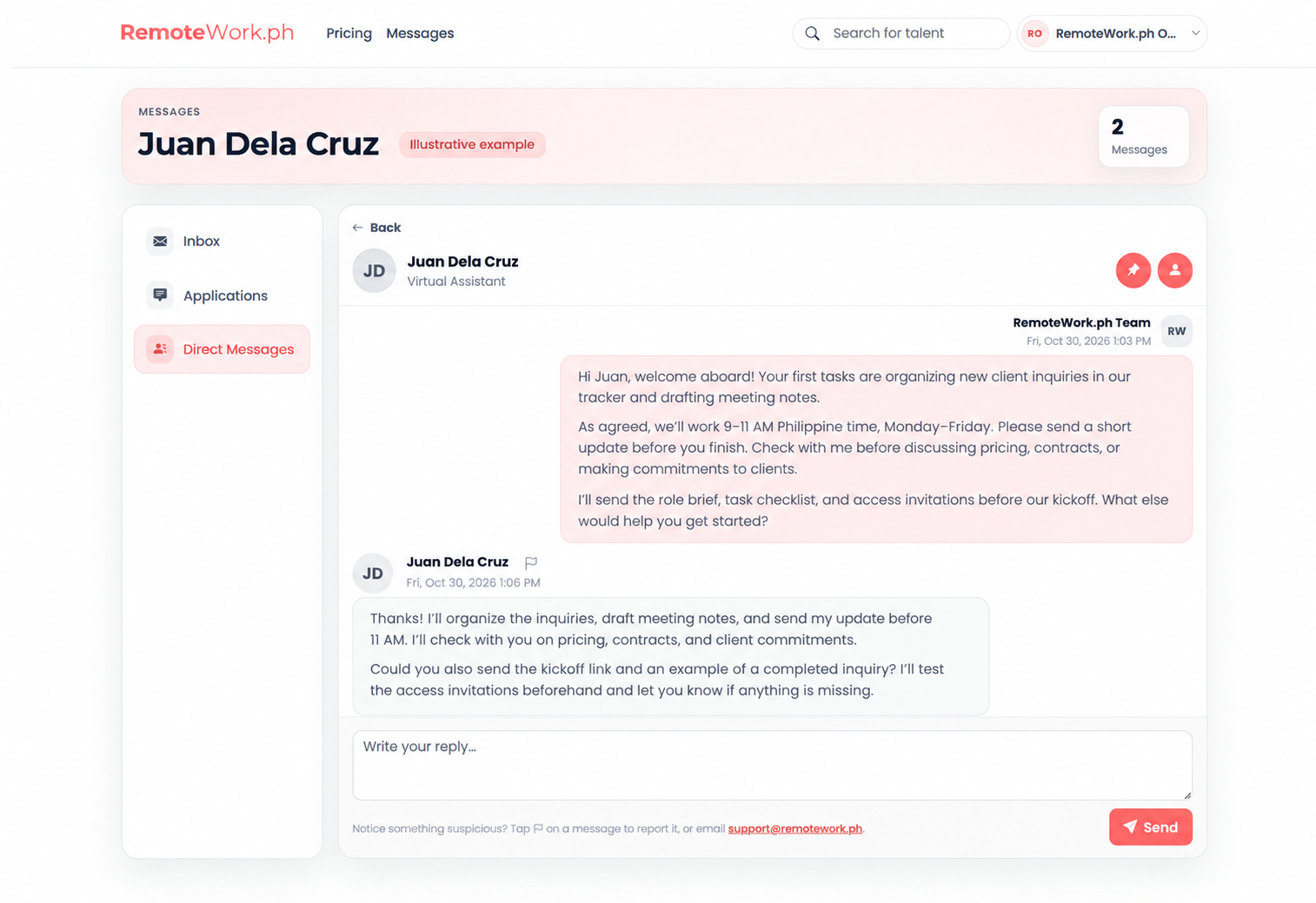
Illustrative employer view: first-week tasks, agreed hours, approval limits, and Juan’s response.
4. Have the candidate confirm the instructions
On the candidate side, select Messages, then Direct Messages, and open the employer’s conversation. Enter the response in Your reply and choose Send. Juan confirms the initial tasks, daily update, and approval boundaries, then asks for the kickoff link and a completed example. He also agrees to test access before starting.
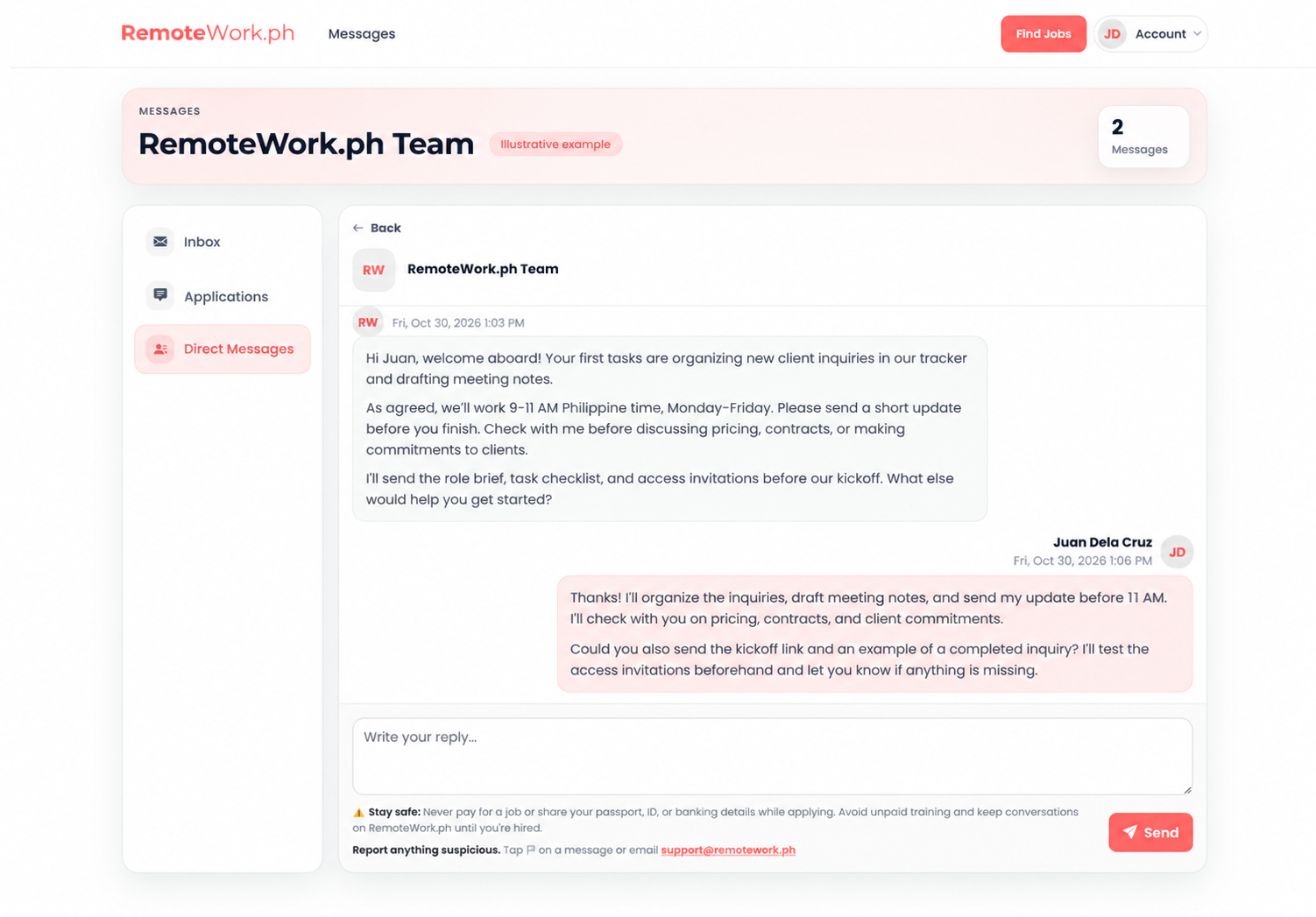
Illustrative candidate view: Juan Dela Cruz confirms the handoff and requests the details needed to begin.
The exchange illustrates confirmation of instructions, not a completed hire or working access. Before the first day, share the requested documents and individual invitations through your chosen tools, then have the VA confirm access. Use the onboarding checklist above to track the handoff.
After selection, use your own agreed onboarding documents, communication tools, and task system. Do not assume the hiring marketplace replaces project management, access controls, or manager feedback. Preparing these items before a new VA starts gives the working relationship a clearer foundation.
Common Virtual Assistant Onboarding Mistakes
Delegating outcomes without context
“Handle my inbox” is not a complete instruction. Define categories, examples, priorities, and exceptions before handing over responsibility.
Sharing too much access too early
Give permissions for assigned work and review them as responsibilities change. Convenience is not a reason to share the owner’s account or expose unrelated client files.
Expecting mind reading or immediate independence
Experienced virtual assistants still need to learn your customers, personal preferences, and internal standards. Explain why a correction matters and give an example of the expected result.
Ending support after the first week
Keep a predictable feedback routine as the work grows. Ongoing support and updated documentation help resolve new exceptions instead of letting small misunderstandings become repeated problems.
Virtual Assistant Onboarding FAQs
How long should virtual assistant onboarding take?
Use the first 30 days as a planning framework and adapt it to task complexity and working hours. Simple tasks may become familiar earlier, while specialized responsibilities can require continued training beyond the first month.
What should I prepare before my VA starts?
Prepare a role summary, schedule, communication expectations, key contacts, individual access invitations, SOPs, and a low-risk first task. Confirm agreements and relevant paperwork before work begins, and test that essential documents are accessible.
What should a VA onboarding questionnaire ask?
Ask about availability, tool familiarity, preferred communication channels, training needs, and questions about the role. Collect only information needed for the work. Discuss access requirements through the appropriate secure process rather than asking for passwords in a form.
Do I need project management software?
Not necessarily. Start with a shared task list if it clearly records ownership, deadlines, status, and instructions. Add project management software when the workload or collaboration needs justify it, rather than buying tools before defining the process.
How do I know whether onboarding is working?
Check whether the VA understands priorities, completes agreed tasks to the defined standard, raises blockers appropriately, and knows when approval is needed. Review actual work together and adjust the training plan instead of relying only on activity counts.
How should a VA communicate with new clients?
Provide approved reply examples, a short voice guide, and rules for escalating questions. Review early drafts for accuracy and brand consistency before allowing independent responses. Keep pricing, contractual commitments, and sensitive requests with the authorized decision-maker until responsibilities are explicitly agreed.
A strong onboarding process starts with preparation and continues through clear communication, practice, and regular review. If you are still selecting your next hire, browse Filipino virtual assistant profiles and use the checklist above to prepare for the handoff.